
Description of NCH VideoPad Video Editor Pro 18.62:

Are you looking for an easy-to-use video editor that lets you create professional-looking videos without spending hours learning complicated editing software? Whether you want to edit YouTube videos, create social media content, produce tutorials, or combine your favorite clips into a polished movie, having the right editing tool can make the entire process much easier.
NCH VideoPad Video Editor Pro 18.62 Full Version is a video editing application developed by NCH Software. It provides a collection of tools for editing video clips, adding transitions, applying visual effects, working with audio, inserting text and subtitles, and exporting completed projects in different formats.
The software is designed to make video editing accessible to beginners while providing useful editing capabilities for more experienced users. Its straightforward interface, timeline-based editing environment, and support for numerous media formats make it a practical option for people who want to create and customize videos on their computers.
VideoPad Video Editor Pro is a desktop video editing program developed by NCH Software. It allows users to import video clips, arrange footage, edit audio, apply visual effects, add transitions, and produce finished videos for different purposes.
Unlike basic video trimming applications, VideoPad provides a more complete editing environment with multiple video and audio tracks. Users can combine different media elements, adjust individual clips, add titles, and customize the appearance and sound of their projects.
NCH VideoPad Video Editor Pro 18.62 Key Features:
Easy Video Editing Interface
- One of the main advantages of VideoPad is its user-friendly interface. The software organizes its editing tools into different sections, allowing users to access common functions without navigating through complicated menus.
- Users can import media files, preview clips, arrange footage, apply effects, and export their projects from the main workspace.
- The interface includes dedicated sections for working with clips, sequences, audio, effects, and exporting. This organization makes it easier to manage different stages of the editing process.
- Beginners can start with basic editing operations, while experienced users can explore additional tools for more detailed adjustments.
Multiple Video and Audio Tracks
- VideoPad supports multiple video and audio tracks, allowing users to combine different media elements within a single project.
- For example, you can place your main video footage on one track, add images or text overlays on another, and arrange background music or narration on separate audio tracks.
- This flexibility is useful when creating tutorials, promotional videos, presentations, and other projects that require multiple layers of content.
- The software also provides timeline and storyboard editing modes, helping users organize clips according to their preferred workflow.
Video Effects and Transitions
- Adding effects and transitions can make a video more attractive and improve the flow between different scenes.
- VideoPad includes a collection of visual effects and transitions that users can apply to individual clips. These tools help customize footage and create smoother scene changes.
- Some editing possibilities include:
-
- Color correction and visual adjustments
- Blur and pixelation effects
- Zoom and pan effects
- Fade transitions
- Scene transitions
- Animated effects
- Effect masking
Users can also combine multiple effects on a single clip and adjust their properties to achieve the desired appearance.
Audio Editing and Background Music
- Good audio is just as important as good video. VideoPad includes audio editing tools that help users improve sound quality and create a more engaging viewing experience.
- You can add background music, voice recordings, sound effects, and narration to your projects. The software also allows users to adjust audio volume, remove unwanted sound, and apply audio effects.
- Additional audio cleanup tools documented by NCH include noise reduction, high-pass and low-pass filters, automatic gain control, and dereverberation.
Add Text, Titles, and Subtitles
- Text elements help communicate information and make videos easier to understand.
- VideoPad allows users to add titles, captions, subtitles, and other text elements to their projects. You can customize the text’s position, font, size, and color to match the style of your video.
- The software also provides tools for adding subtitles and supports automatic subtitle generation using AI-powered speech recognition in its documented feature set.
- This can be particularly useful for educational videos, interviews, product demonstrations, and content intended for viewers who prefer watching videos with captions.
Video Stabilization
- Footage recorded using handheld cameras or mobile phones can sometimes appear shaky.
- VideoPad includes a video stabilization feature designed to reduce unwanted camera movement and make clips look smoother.
- This feature can be helpful when editing travel footage, outdoor recordings, event videos, or other content captured without a tripod.
- Instead of leaving shaky footage unchanged, users can apply stabilization to improve the overall viewing experience.
3D and 360-Degree Video Editing
- VideoPad also supports editing and exporting 3D and 360-degree video files.
- These capabilities provide additional flexibility for users working with specialized video formats rather than conventional flat footage.
- The software includes dedicated tools for handling 360-degree video, allowing users to work with immersive footage and customize their projects.
- This feature can be useful for creators experimenting with panoramic videos, immersive content, and compatible 3D media.
Video Speed Adjustment
- Changing video speed is a useful editing technique for creating different visual effects.
- VideoPad allows users to adjust the playback speed of individual clips. You can slow down footage to emphasize important moments or increase its speed to create a time-lapse-style effect.
- This feature can be useful for travel videos, tutorials, sports footage, product demonstrations, and creative social media content.
Green Screen and Background Editing
- The green screen feature allows users to replace a suitable background with another image or video.
- This technique, commonly known as chroma key editing, is useful when creating presentations, tutorials, promotional content, and creative video scenes.
- For example, a presenter can record footage against a green background and replace it with a virtual office, classroom, or customized visual environment.
- VideoPad also provides tools for working with background elements and overlays.
Video Cropping, Trimming, and Splitting
- Basic editing operations are essential for almost every video project.
- VideoPad makes it possible to trim unwanted sections, split clips into smaller parts, crop footage, rotate videos, and rearrange different scenes.
- These tools help users remove unnecessary content and organize their footage before applying more advanced effects.
- The ability to perform these operations directly within the editing workspace makes the software convenient for everyday video production.
Supported Video, Audio, and Image Formats
One important consideration when choosing video editing software is format compatibility. VideoPad supports a wide selection of media formats, making it easier to import footage from different cameras, devices, and recording applications
- Video: MP4, AVI, MOV, MKV, WMV, MPG, MPEG, MTS, VOB
- Audio: MP3, WAV, AAC, FLAC, M4A, WMA, OGG
- Images: JPG, JPEG, PNG, BMP, GIF, TIFF
- Export: MP4, AVI, MOV, MKV, WMV, MPG, GIF
System Requirements:
- Operating System: Windows 7, 8, 8.1, 10, or 11
Processor: Intel Core 2 Duo 2.0 GHz or AMD Athlon 64 X2 5000+
RAM: 2 GB
Graphics: DirectX 9.0c-compatible 3D accelerated graphics
Display: 1024 × 768
Screenshots:
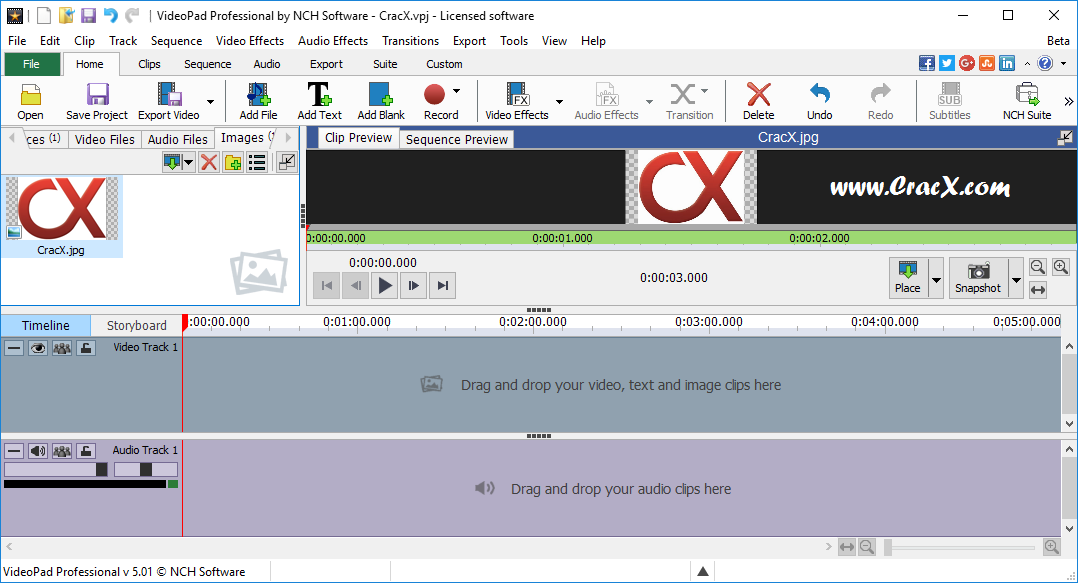

NCH VideoPad Video Editor Pro 18.62 Full Version Free Download from the link given below:
